

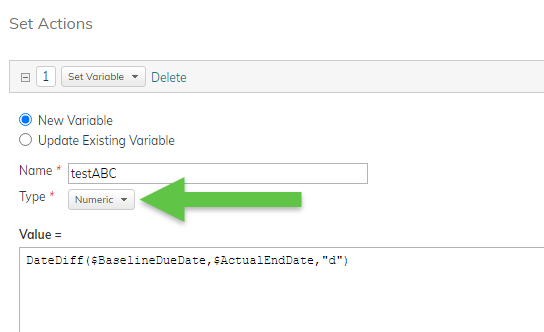
Hello! I’m being asked to create a report where we can see if a project is adhering 75% to the original timeline. I thought about creating a custom field based on a formula which would divide $BaselineDuration by a value that is calculated from a field with the formula DateDiff($BaselineDueDate,$ActualEndDate,’d’). I get an error when doing this, “Error: Data types Numeric and Duration not compatible for '/' operation” If I try to save DateDiff($BaselineDueDate,$ActualEndDate,’d’) as a duration instead of a numeric value, I get the error: Error: Formula evaluation result data type is Numeric instead of expected Duration.

Solved
Calculations based on timelines
Best answer by zfieldsgreystar
Hi Eric,
It sounds like the Field Type for your custom field is Duration which is where “data type is Numeric instead of expected Duration” is from. Have you tried creating this as a Numeric or Percent field type?
-ZF
This topic has been closed for replies.





Planview Customer Community
Already have an account? Login
Planview Customer Community
No account yet? Create an account
Login with SSO
Login with Planview Adminor
Enter your E-mail address. We'll send you an e-mail with instructions to reset your password.
All Data Subject Access Requests (DSARs), and requests of “Do Not Sell My Personal Information” according to the CCPA, must be submitted through the Planview DSAR portal located here
Planview has appointed a Data Privacy Officer (DPO) to be responsible for overseeing our Privacy Management Program and related privacy compliance measures. DPO can be contacted at privacy@planview.com
Planview has appointed a Data Privacy Officer (DPO) to be responsible for overseeing our Privacy Management Program and related privacy compliance measures. DPO can be contacted at privacy@planview.com