

Solved

Can we search to choose a SharePoint item?

  • November 22, 2023
  • 7 replies
  • 153 views

Forum|alt.badge.img

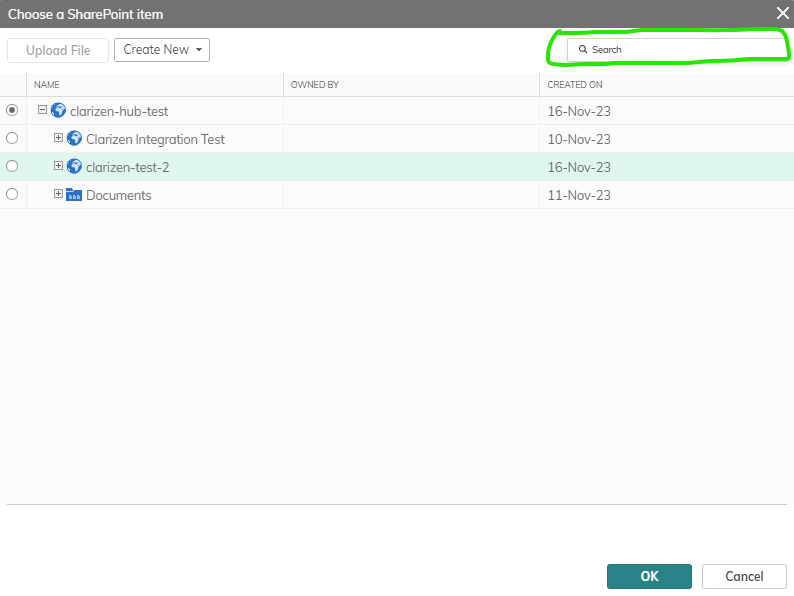
We have sharepoint integrated with Planview. We are going to link all projects’ sharepoint sites under the hub. The only issue I find so far is that I can not use the search function to choose a sharepoint item. In the screenshot example below, I tried to search different key words like “Integration”. The result is always “No Files”.

I wonder whether this is currently a limitation because sharepoint is only linked and the “search” function only works when finding things locally within Clarizen?


Best answer by Sai Sravan

Hello @Cindy Chi,

There are two ways to go about here.

  1. Please write to our care team at customercare@planview.com with the details of the issue you are facing or
  2. You can submit a case by using this link

Thanks!

This topic has been closed for replies.

7 replies

bkrutiy
Bronze Product Expert
Forum|alt.badge.img+4
  • Bronze Product Expert
  • November 22, 2023

Cindy, 

I do not have SharePoint but this is most likely an issue. I would report it as a possible bug to the AdaptiveWork Support team. They will be able to investigate and verify if this is a bug or not.


Forum|alt.badge.img
  • Author
  • Bronze Active Participant
  • November 22, 2023

Thank you very much, Boris!


jsantos
Planview Falcons
Forum|alt.badge.img
  • Product Expert
  • December 4, 2023

This looks like a bug, as Boris mentioned please submit a case and we’ll look into it right away. Thanks!


Forum|alt.badge.img
  • Author
  • Bronze Active Participant
  • December 6, 2023

I don’t know how to submit a case. Could someone please provide some guidance if I am supposed to do it? Thanks. 


Sai Sravan
Planview Falcons
Forum|alt.badge.img+1
  • Planview Falcons
  • Answer
  • December 11, 2023

Hello @Cindy Chi,

There are two ways to go about here.

  1. Please write to our care team at customercare@planview.com with the details of the issue you are facing or
  2. You can submit a case by using this link

Thanks!


Forum|alt.badge.img
  • Author
  • Bronze Active Participant
  • December 11, 2023

Thanks Sai. I’ve emailed customer care for this case. 


Forum|alt.badge.img
  • Author
  • Bronze Active Participant
  • December 11, 2023

Case: 00740862 created.

Case URL