Hello Community, is there a way to mass upload information for existing users without AW creating new users? I’m looking to add resource ID’s to our existing users in AW but when I import the spreadsheet with the existing names and IDs, it creates completely new users resulting in duplicate users.
Many thanks!
Best answer by Limori
Hi Kayla
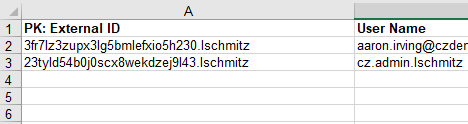
I apologize for misleading you with the User Name… it is in fact the External ID that should be used to be referenced with PK as the unique identifier:
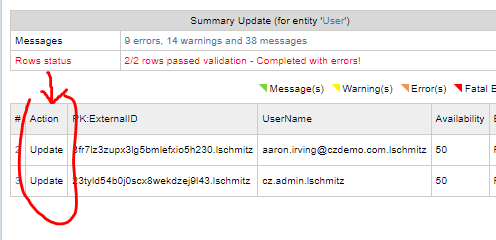
As dataloader is going through a 2-step process, it indicates for you whether it is about to Update or to Add a record in the system:
A few tip for dataloader:
only include the fields that you want to necessarily update (+the External ID field in the context of Users) - this will also reduce time for dataloader to perform the action
always run 1st a load of 1-5 rows to check that all works according to expectations before you move on to a mass update / upload.
Hey Kayla, when you are doing the import have you got “PK:” on the user ID or the user email column? That should pick it up as the Primary Key to look up the existing users, and do an Update instead of an Add?
Which object are you importing against? That must have something to do with it? Are you importing a link between existing objects, or the object itself?
I apologize for misleading you with the User Name… it is in fact the External ID that should be used to be referenced with PK as the unique identifier:
As dataloader is going through a 2-step process, it indicates for you whether it is about to Update or to Add a record in the system:
A few tip for dataloader:
only include the fields that you want to necessarily update (+the External ID field in the context of Users) - this will also reduce time for dataloader to perform the action
always run 1st a load of 1-5 rows to check that all works according to expectations before you move on to a mass update / upload.