
Question

Error when running data loader workflow

  • July 29, 2024
  • 3 replies
  • 66 views

Forum|alt.badge.img
  • Bronze Active Participant

How do I get around this error:

Maximum allowed errors threshold for business rule 'Import Project Assignments' exceeded.

Please contact your company administrator.

This topic has been closed for replies.

3 replies

mikayla.martin
Planview Partner
Forum|alt.badge.img+1

Hi sfloyd, 


This error message is referring to the ‘Import Project Assignments’ business rule (I assume a workflow rule). This means the rule errored out as a result of running the Data Load and triggering this rule. 


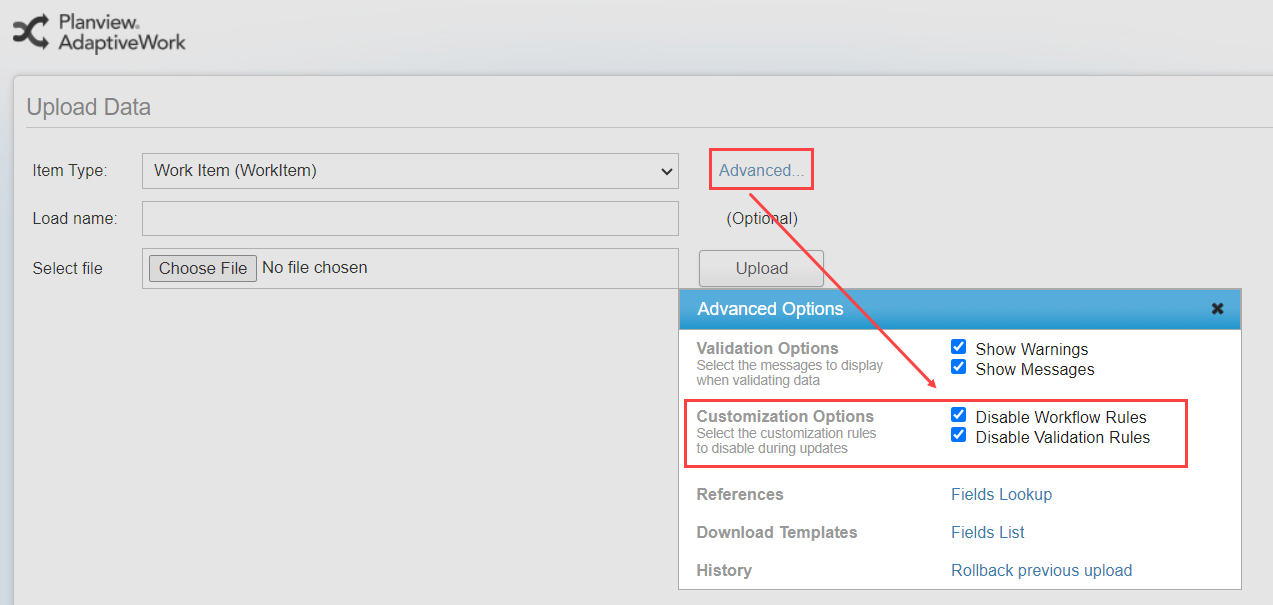
When completing a data load, you can disable rules and validations from running on the data in your excel file. 


Hope this helps!

Mikayla


Forum|alt.badge.img
  • Author
  • Bronze Active Participant
  • August 5, 2024

I was able to disable and then re enable the workflow - which resets the counter.


Forum|alt.badge.img+1

Hi @sfloyd  -  are you using the Data Loader to add Project Assignments?  I’m really keen to see how that is done.


Thanks!