I am configuring a Workflow rule for Project entity to automate actual end date to Contribution entity which associated to this project or CurrentObject. I guess to use function getlink but cannot find LinkEntity for first parameter.
Any responses are higly appreciated.
Sincerely,
Phat Nguyen
Best answer by petegush
Hi @phatnh
Contributions don’t use a link object to relate to a work item. Rather they are connected via the contribution field Associated Item; this field then has a reverse reference with label Contributions which is what you see on the Contribution panel on a Project.
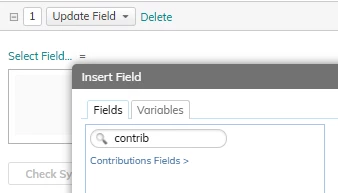
To update a field on the Contribution from a Project you can use the Update Field action in your Workflow on the project. Select Contributions Fields and then the field on the contribution that you want to update.
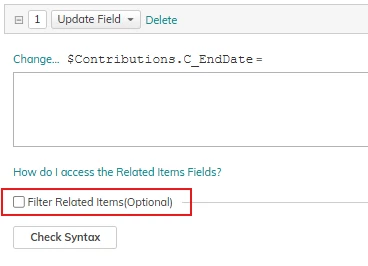
If you only want to update specific Contribution objects, you can apply a filter to your update field action.
Contributions don’t use a link object to relate to a work item. Rather they are connected via the contribution field Associated Item; this field then has a reverse reference with label Contributions which is what you see on the Contribution panel on a Project.
To update a field on the Contribution from a Project you can use the Update Field action in your Workflow on the project. Select Contributions Fields and then the field on the contribution that you want to update.
If you only want to update specific Contribution objects, you can apply a filter to your update field action.