

Question

Roll up "Current Milestone" to Project level for visibility

  • September 30, 2025
  • 4 replies
  • 57 views

bkrutiy
Bronze Product Expert
Forum|alt.badge.img+4
  • Bronze Product Expert
  • 47 replies

Hello Community, 

I am trying to show the Current Active Milestone at the Project level for visibility on projects and reports. I was able to create a rule that updates this field based on a filter using State = Active and Executable = True. When there are dependencies used and only one Active/Executable Milestone at any given time on the project, this works flawlessly. 

The issue arises when there are older WBS in play and dependencies are not properly used. In this case, there can be multiple Milestones with Active/Executable state and the rule always updates with the last Milestone not the first, which would be the preferred outcome. 


Question: Short of updating every project to use dependencies at the milestone level as a limitation to this configuration, is there anyway to bypass this issue and roll up the Current Active Milestone wheather there is one that matches or the first milestone when there are multiple matches.

Hope this makes sense. Thanks in advance.

4 replies

Aayush
Planview Falcons
Forum|alt.badge.img+3
  • Community Manager
  • 59 replies
  • October 14, 2025

Hi Boris - I’ve requested our AW Experts to take a look at your request. They’ll review it and get back to you soon.


Forum|alt.badge.img
  • Planview Falcons
  • 9 replies
  • October 16, 2025

Hi Boris

Can you clarify what you mean by “first milestone”? ie the one that is due to start the earlier? or finish latest? 

Could you provide an example of two milesotnes and what data point(s) indicate which would be considered “first”?

Or is it based on whcih one displays first in the workplan?

Thanks

Pete


bkrutiy
Bronze Product Expert
Forum|alt.badge.img+4
  • Author
  • Bronze Product Expert
  • 47 replies
  • October 30, 2025

@petegush 


If you have a project workplan without dependencies, you will have multiple Milestones/Tasks as Active AND Executable. What I am looking for in this scenario is the first Milestone in the list of milestones to show as the “Current Milestone” at the project level. For example, you have a workplan with the following hierarchy.

Project TEST

  • Milestone 1
    • Task a
    • Task b
  • Milestone 2
    • Task a
  • Milestone 3
    • Task a
    • Task b
    • Task c

When there are no dependencies configured and the project is Active, all Milestones will show as Active and Executable. What I would want is for the first Active/Executable Milestone (Milestone 1) to be captured and listed in the parent project custom field “Current Milestone”. However, in all my efforts, every time this scenario appears, Milestone 3 is shown (last one instead first). This is happening due to the variable I am updating and running on Milestones and the last updated is what I get. How can I pull the first one and keep that in the variable?


Forum|alt.badge.img
  • Planview Falcons
  • 9 replies
  • October 31, 2025

@bkrutiy 

Thanks for clarifying. If I understand this correctly the below should work.

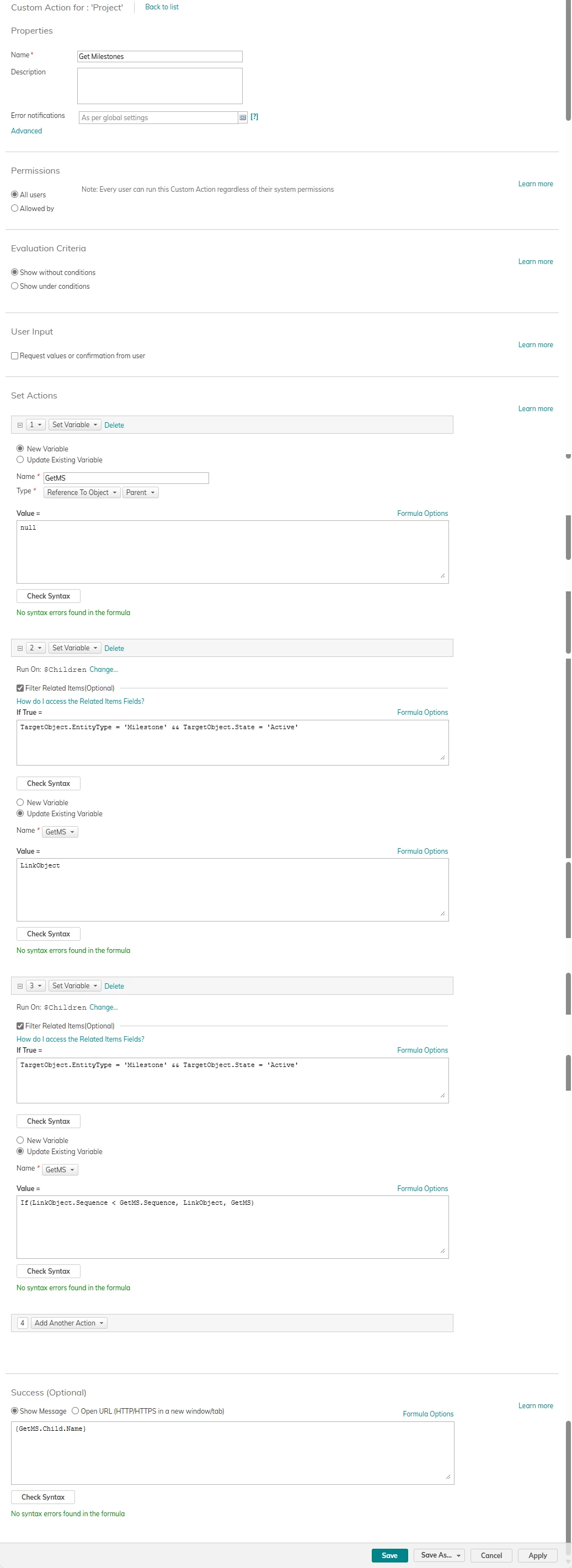
The order of objects in a hierarchy is determined by the Hierarchy link field “Sequence Order”; you can run a workflow on the project’s sub item links, and capture the link with the lowest sequence order value (where the target object is filtered to Milestones that are active, and/or any other criteria). Once you have the link object as the variable you can then access the related milestone (child on the link) and write that to the project.

I’ve attached a screenshot of a CA that shows this logic - have a play and let me know how you get on.

Pete