
Question

Financial Plan: See the Project WBS hierarchy and roll up totals ???

  • June 12, 2026
  • 2 replies
  • 15 views

Forum|alt.badge.img

URGENT please - A basic requirement in Project Management from our project managers, effort and cost breakdown vs time? 
Using Portfolio Financial Plan, how can we see the roll-up cost at parent task levels…

A typical WBS is as follows:
Project
Work stream 1
     Cpy A
        Task A.1
        Task A.2
    Cpy B
       Task B1
       Task B2

Work stream 2
     Cpy C
        Task C1
        Task C2
    Cpy B
       Task B1
       Task B2

The leaf level is Task.
How can I see the rolled-up effort and cost per month in the financial plan for Work Stream and Cpy level?

In the Financial plan/report, we would like to see (for labour cost and effort)

                           Mth1          Mth2   ...

Workstream 1     £55            £65
    Cpy A              £30            £30
        Task A.1      £10            £5
        Task A.2      £20            £25

    Cpy B              £25           £35
       Task B1        £5             £20
       Task B2        £20           £15 


The Financial Plan only show the Effort and Cost at Leaf level… how can I include the parent tasks roll up? Please let me know how you all do this in Portfolio?

Thanks

Tony

2 replies

Forum|alt.badge.img+2
  • Gold Innovator
  • June 15, 2026

Hi ​@Happytoon 

Financial Planning in Planview typically stores and displays costs at the lowest planning entity level. Native roll-up of monthly financial values to intermediate WBS summary tasks is generally not available directly within the Financial Plan grid.

If rolled-up reporting is required, you usually consider one of the following approaches:

Use Project/Task hierarchy reports where summary task values are calculated through reporting.
Create custom reports in Analytics/Power BI that aggregate cost and effort across child tasks.
Plan financials at the level where reporting is required (for example Capability or Workstream level rather than leaf task level).


Forum|alt.badge.img+2
  • Planview Falcons
  • June 24, 2026

@Happytoon please consider these options:

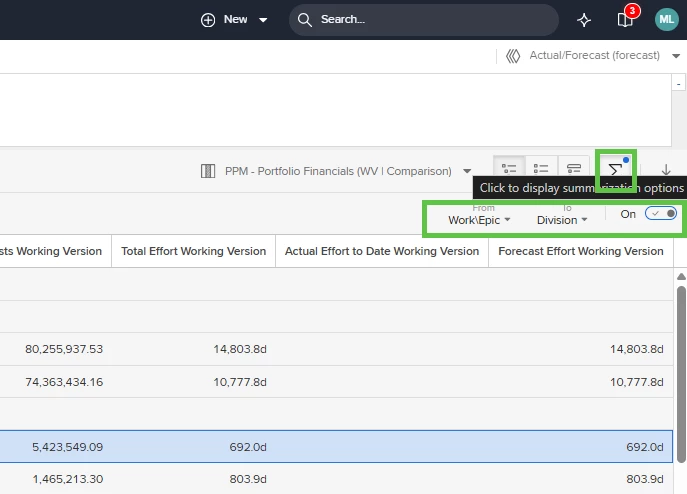
In Portfolio View you have a sum function, that does the maths up the hierarchy that you are wanting to see.

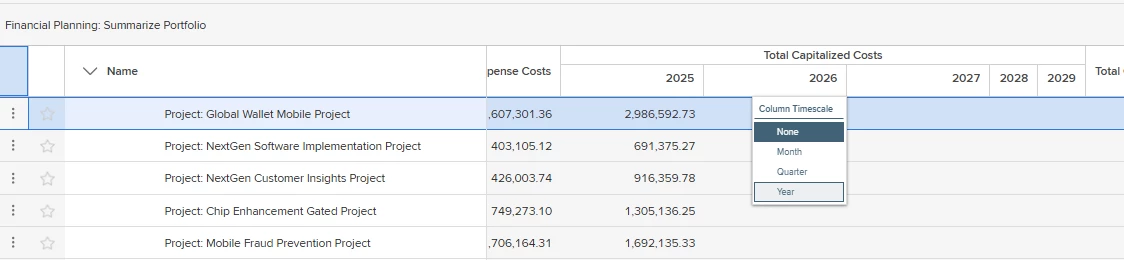
Clicking on the header of a Financial Sub-Total/Calculated column gives you option to show time slices.


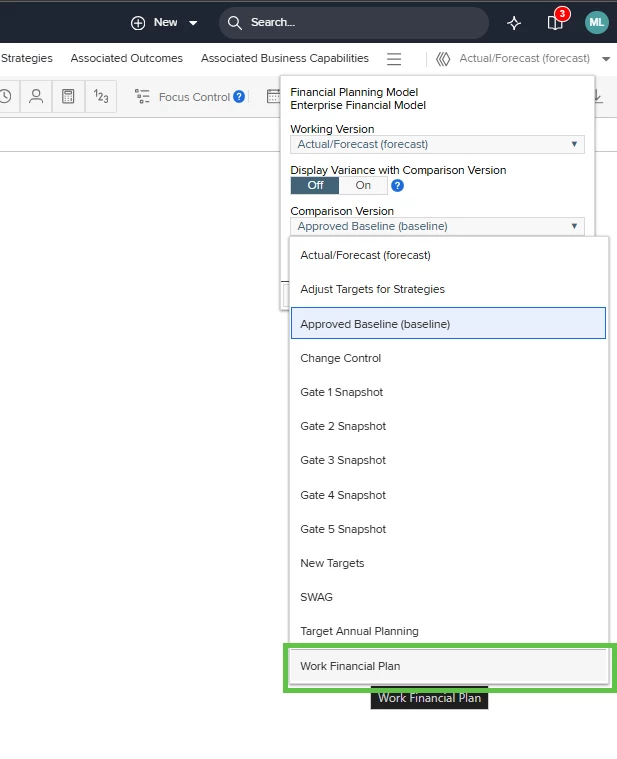
You can enable the “Work Financial Plan” option in Financial Planning Detail that will display activity level effort and costs against the project level Financial Management aggregation. If you don’t see this “version” at the end of your version list then there is a global option to enable it.


Forum|alt.badge.img
  • Author
  • Bronze Active Participant
  • June 24, 2026

Hi Mlea, 
Thank you,
I do use a financial column set on the Work portfolio and use the Sum up function. The problem with a work portfolio is that, as far as I know, it only shows a list of projects at the top level (total cost/effort for the project), not the breakdown of each Work Package within these projects.
I also use the Work Financial plan at the project level, but it only shows the Effort/cost monthly total at the task (leaf) level, not summed up to the work package/summary task level.

As per my structure above, I want to see the monthly effort/cost for CPY A and CPY B (work Package), which is a sum up of the tasks under each (CPY A = Task A.1 + Task A.2, etc.). And then, also the cost/effort rolled up to WorkStream 1 = CPY A + CPY B).

Any tip/config change would be greatly appreciated.
Thank you all.