

Sandbox management Process and Best Practices

  • May 20, 2026
  • 1 reply
  • 15 views

Mike.Walker
Planview Falcons
Forum|alt.badge.img

Does anyone have a good strategy for managing sandbox environments in a connected Planview setup?

We’re interested in understanding how others use SB1, SB2, and SB3 for configuration, testing, training, and release validation before promoting changes into Production.

If you have a process that works well, I’d especially love to hear:

  • how you manage promotion and governance across environments

  • how you handle sandbox refreshes, validation, and ownership

  • how you think about cross-product or multi-database considerations

  • any lessons learned from operating in a more controlled or highly governed environment

Any examples or best practices would be greatly appreciated.

1 reply

pamela.sargent
Gold Knowledge Guru
Forum|alt.badge.img+7
  • Gold Knowledge Guru
  • May 20, 2026

Hello ​@Mike.Walker , 

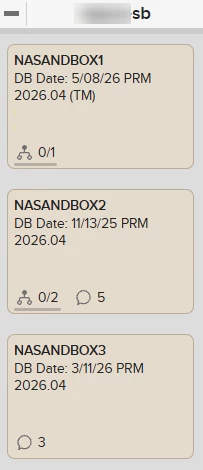
At NASCO, our Planview Support Teams utilize AgilePlace to manage our backlog of work. In our board layout we have a lane called ‘Databases’ and a card that represents each database. We update the title of the card to reflect when we overlaid the data so we always know the age of the data in that database.

As we work on initiatives that require testing in a sandbox, or for our upgrade process, we then connect our initiative/work item to the corresponding sandbox card, setting the sandbox card as the parent.  This then quickly allows us to identify what sandboxes are being used and we can then look at what work is being done within it.  We also take it a step further and on the initiative/work item card we use the indicator to identify 1, 2, 3, etc so visually on that card we know what sandbox we are using for testing purposes. 

We also utilize the planned finish date on our AP cards to identify our target date for pushing something to production and closing out our initiative/work item. This helps us plan accordingly and see if multiple things are occurring at one time so that we can plan combined communications or simply understand impact. Part of our tasks on our cards (when we use predefined templates) is identifying the communication needed to users. 

It did take some time to get everyone in the flow of this process but now we can’t imagine managing without it. There are 2 primary PV Admins that handle sandbox overlays. The request comes to one or both and instead of having to check in with everyone to see if they are using a sandbox we can just use the indicators on the card and know which one we can overlay. It has definitely saved time and headaches. 

Happy to share more if you need/like.