
Question

Task Upload via Soap

  • April 21, 2026
  • 3 replies
  • 33 views

Forum|alt.badge.img+1

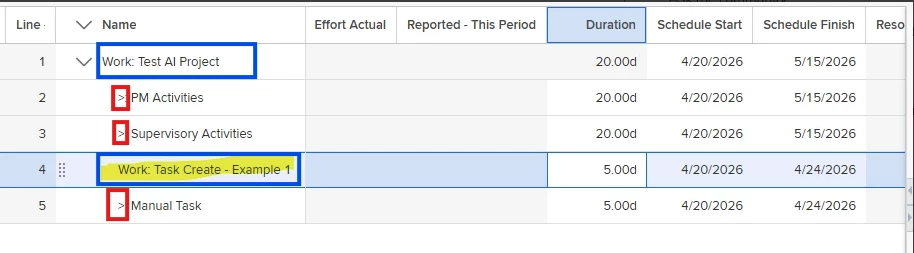
I have a task upload written using a SOAP call to the ITaskService3 service. I can get it to create new tasks, but it loads them like they are at the PPL level. They have the Work prefix that displays and no indent sign (see screenshot). I did some searching in the backend and it seems like the exec_type field is being set on these tasks even if I use the option not to copy missing values from Planview. Anyone else have this working and can maybe help? 

3 replies

mserafinowski
Gold Product Expert
Forum|alt.badge.img+3
  • Gold Product Expert
  • April 27, 2026

Hi ​@bstrong Can you confirm what father key you’re using when creating the task? Is it meant to be created under a specific parent task (for indentation) or are you only passing the work sequence ID and expecting Planview to indent it automatically? Also, what is you ns1 description for the task you’re trying to create? To get tasks indented, they must be created under another task, not directly under the project and father key has to reference a parent task key, not the project or project sequence.
Exec_type doesn’t control the hierarchy in the WBS plan… 


Forum|alt.badge.img+1
  • Author
  • Silver Active Participant
  • May 7, 2026

Hi, I’m using the father key of the project since I want the task to be in the next level down. The description = “Task Create - Example 1”. The indentation is correct. (the task is getting created at the right level in the project)

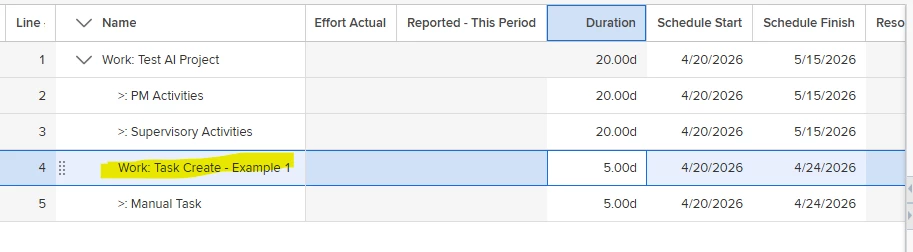
My problem is that PV is displaying the task with the “Work” prefix in front of it, which is what the exec_type controls. (see screenshot)

I ended up running an another soap call to IAttributeService2 to update the exec_type so it displays correctly in the plan. 

Thanks


mserafinowski
Gold Product Expert
Forum|alt.badge.img+3
  • Gold Product Expert
  • May 8, 2026

Glad you’ve found a solution! 😊 I was a bit confused because from your screenshot it’s not clear why the task you created is at the same level as the project. Lines 2, 3 and 5 seem to sit under the PPL but line 4 doesn’t. What names are you using for the $Plan levels? The labels might be controlled by the execution type but that’s usually only at the PPL level. I’ve tested this a few times and only see these labels for new projects not for lines below the PPL. That’s why I’m still unsure why your line was created at the same level as the project. Do you have a default PPL Only value set for this structure?
Still, the prefixes you see in the project plan usually come from $Plan level names. 

IAttributeService2 worked fine but the question of why your task and your project are at the same WBS level is still open for me…
 

Best, 
Michal