
Dependency Management - A workable solution!

  • January 21, 2026
  • 3 replies
  • 99 views

Forum|alt.badge.img+3

Last year I raised a post about the use of the various inter-project dependency management options available in Planview - Successor/predecessor relationships in plans, investment dependencies, CRI logs, Roadmaps - the options are extensive but they all had their limitations.  If you really need to create a ‘hard link’ between milestones in 2 projects, you only had one option - use the successor/predecessor relationships in the plan & leverage the Inter Projects Dependencies tile, accepting that this approach could result in cascading plan changes across the entire portfolio.

I’m pleased to say that the latest Logbook release has provided a much more controllable solution - the Multiple Associations finally allows me to create a dependency record in a log, use this to hold the dependency context and create a ‘contract’ with my dependent project PM and link key milestones from both project plans without the risk on plan changes automatically cascading onto other projects.  Some smart PowerBI linking of the Log entry with the milestone details across both projects gives a great view of whether dependencies are aligned - exactly what we needed!

Big shout out to ​@sindhukashyap and the team for turning this around!

3 replies

Forum|alt.badge.img
  • Planview Falcons
  • January 29, 2026

Thank you ​@James Bonfield and we are absolutely thrilled to learn that it brought so much value to what you do! ✌🏼


Forum|alt.badge.img

@James Bonfield We are trying to do something similar and struggling with how to track dependencies across different projects and then visualize them for leadership. Any chance you’d be willing to share what you’ve done?


Forum|alt.badge.img+3
  • Author
  • Platinum Innovator
  • March 24, 2026

@James Bonfield We are trying to do something similar and struggling with how to track dependencies across different projects and then visualize them for leadership. Any chance you’d be willing to share what you’ve done?

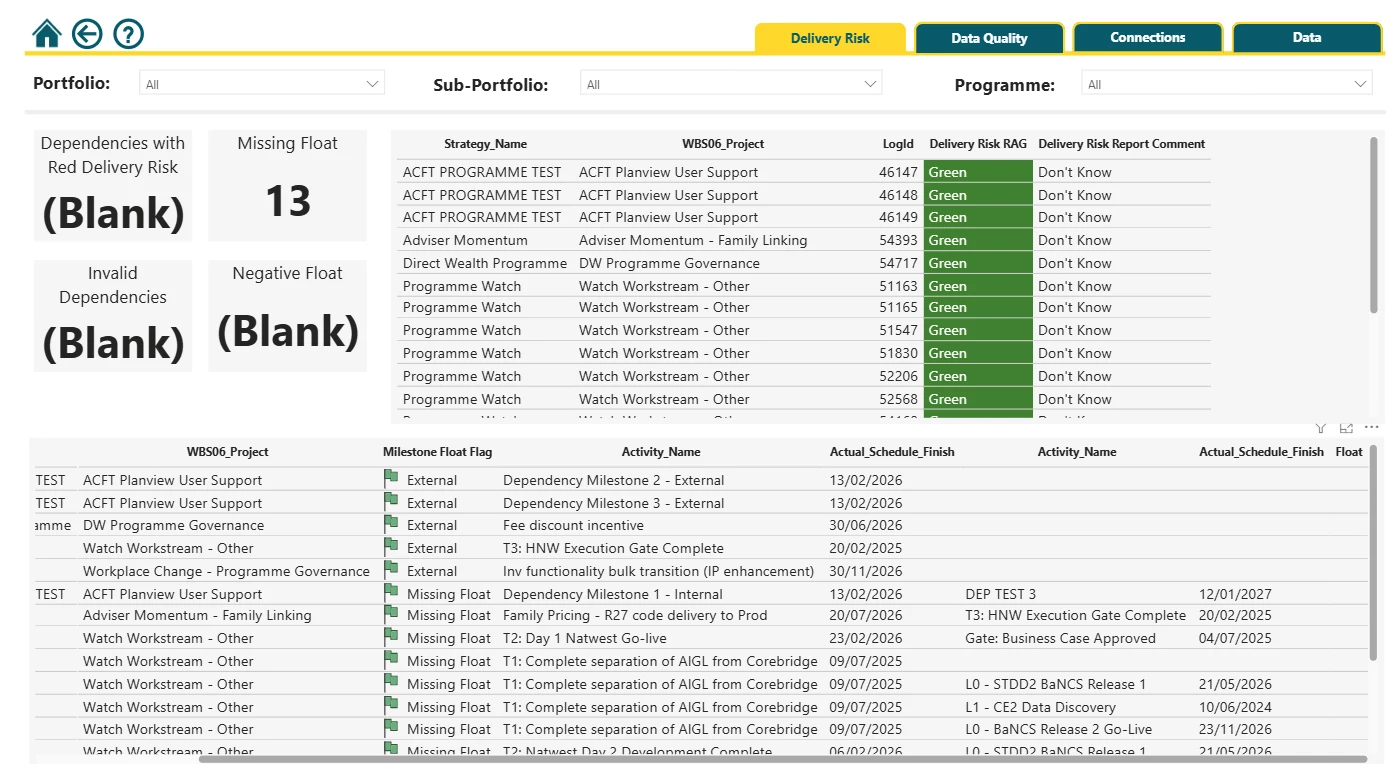
Hi ​@Rachel.Reissfelder - I’m fortunate to have access to a great MI team how can string together the appropriate data sources and create PowerBI dashboards to visualise this data.  This is still in a development phase, but we’re able to link together:

  • The Logbook Record, which holds the context of the dependency, the link to a milestone on ‘my’ project and on a dependent project, the name of the dependent Project’s PM (they become the assignee and by adding their name, they get emailed automatically, creating a ‘contract’) 
  • ‘My’ project plan dependency held as a milestone - this holds some reporting criteria, a RAG status, schedule dates, etc
  • The ‘Dependent plan dependency’ held as a milestone - this holds similar attributes to the above, which are used for comparison purposes
  • The Strategy records linked to each work item - For many of our stakeholders, assessment is top down, or potentially down a slice of the strategy/change portfolio

Based on this, we’re able to identify projects & programmes which ‘my project’ is dependent on, projects & programmes which are dependent on ‘my project’, comparisons between the associated dependent and depending milestones (e.g., RAG status, date alignment, etc), and we can slice this to look at a single project, all projects within a Programme, a Portfolio of projects or the entire enterprise.

We’ve also built in business rules to the dashboard to check on data quality (for example, we want to ensure that dependencies are reviewed each month, we want to ensure that the appropriate Logbook status fields and Association types are used, etc).

Some examples below (WIP using test data), which we’ll continue to refine and develop based on user feedback: