


















Recently active
I like the Hybrid Work Management new UI, however I am still missing the possibility to display custom objects that are relating to a project for example. Are related objects going to be integrated soon in Hybrid Work Management ?
Hello Community, Our organization is working on a Planview-Salesforce integration to bring timesheet entries into Salesforce. The goal is to consolidate all our data in one place for comprehensive management reporting and dashboards. We're encountering challenges getting the timesheet mapping to work correctly. Has anyone successfully implemented a similar timesheet integration from Planview to Salesforce and be willing to share their approach or any tips they learned?Thank you, Carlos Z.
I have been trying to find a way to better present the ‘expected progress’ of a project. The default calculations are soley based on durations, however, most project efforts are not perfectly linear like that, but rather more of an ‘S-curve’. What would be great is if there was a way to save the Time Phased forecast data when a project is ‘Baselined’, so that I could create a custom expected progress field to measure against the ‘baseline forecast’. I have tried created a custom field to capture this via a worfklow, however, it does not seem these time phased fields can be updated via a workflow, or even manually. Am I doing something incorrect?I also realize there is a field called ‘Original’ that may have been intended to serve this purpose, but I am struggling to figure out how this field is calculated, and it appears it cannot be changed once its populated.Anyone have any ideas on how to create this custom functionality, or have some other solutions for the main goal here of produc
Hi, How / Where can I manage the permissions related to templates? I have one superuser who tried to update a template via the “Save as template” and override existing functionality, but she is stopped via a validation rule. I am unsure if this is a default validation rule activating based on her permissions or a custom one set up by the previous product owner. The validation rule seems to stop her from deleting the previously made Template.Does anyone know if the templates have a separate permission configuration and where I can find it or if I should keep looking for a custom validation rule? E.g. does she need to be set as owner on the project she is trying to save as a template?Kind regards, Mathias
Hi, I am looking for any best practices or examples in creating an approval flow for decisions made at certain points of our projects. I know there is an approval flow using e.g. Ziflow but I don’t have access to this one, and is wondering if anyone has had any success with something else, perhaps more simplified?The process is roughly.[Capture project data] → [Add manual comments] → [Send for review] → [Review & Discuss] → [Approve/Decline] → [Lock & Archive]The outcome would be a locked object showing the frozen data, with comments and names of the approvers.I’ve tried using the Document publisher to create a pdf that could be attached to an internal request and perhaps a related “discussion object” but I don’t know if this is the best idea.Any ideas would be welcome. 🙂/Mathias
Hello,Is there any way to update a users capacity (or create a new custom capacity) without having to update a users calendar? E.g. a resource has 80% capacity for Project work. Trying to reflect this in a users calendar is near on impossible due to the admin overhead month by month. Alternatively can anything like this be achieved via a custom method? e.g. not using calendars or the capacity module but being able to state a capacity e.g. 80% and then reference this in reports?Many Thanks,Sean
Today, the custom action form size on some of our custom actions changed? Wondering if anyone else has seen this change and if something was changed in the system to do this? Also, I can’t remember how we set the size of those forms. I think it was in global css but if someone has the solution, please can you let me know so I can change them back to what we had before. Thanks!
Does anyone have any good tips for managing dependencies between Projects in Adaptive Work?
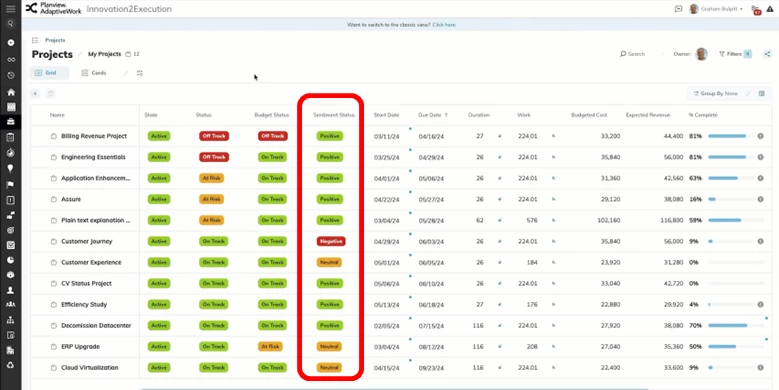
What is it and how will it benefit customers?Sentiment Analysis provides an early warning system within status and project views to address potential risks and issues inhibiting the successful completion of projects and programs.Key features and benefits:Transform unstructured text data into actionable insights by automatically analyzing and classifying sentiments (positive, negative, or neutral) to help you identify potential risks and opportunities for faster, smarter decision-making Fully integrated within AdaptiveWork to provide real-time sentiment scoring powered by LLM technology (no third-party add-ons needed) Easily configurable to your organizational workflows through custom actions and scheduled rules To know more, hit the Customer Success Center links below -What, Why and How to configure: AdaptiveWork Sentiment Analysis Release Notes: February Release
Hi,I have created a new custom panel with some basic HTML in which I just wanted to show the google.com page. However, this doesn’t seem to work as you can see in the below picture.. any idea why? Thx upfront! <div> <iframe style="width:100%;" src="https://www.google.com" title="Google"> </iframe></div>
Could i have access on the community website from my mobilephone?pat
Hello community, I am racking my brain to see if it is possible to apply a Project template (not milestone template) to a new Project that was created via API (not using a custom action with a new item action item (project). For example, we are using an external source to allow Project Request intake. These send projects to AW in Requested state with specified field data. I am sure I can have the template passed using the API but can this be done within AW using a workflow? I want specific project templates used if the new project created was created with a specific region and project type. I know how to do this within a new action that creates a Project and use an IF() function in the Template portion of Creating a project but I am unable to find a way to do this post project creation using a workflow. Is this possible? Thanks in advance.
Hi Team,We have a use case where we need to link milestone to multiple projects just like we can associate projects with multiple portfolios, if somehow we can built a custom field which can show reference to multiple projects that’ll solve our problem.Any help will be greatly appreciated. Thanks in Advance
I have created a project template with 5 milestones. Milestone templates are also saved. I have created a form to create a project which will also create milestone-1.On completion of task under that milestone my milestone as well as project is getting completed. I tried to create a workflow rule on milestone level but it did not create my next milestone. Shall I create workflow rule on project or workitem?My other query is how to create milestone based on a specific project metadata field? Project type = "development" should create my development stage otherwise it should create "support" milestone. If I can get some sample workflows for above 2 requirementsthen that will be great.
I am using the API to pull data for reporting on Power BI. I would like to replicate the Time Phase Monthly data between Projects and Resources - basically, project assignment and the month. Has anyone had success with this over the API? Care to share your rest query? Thanks.
If you’re interested in Planview Copilot, our upcoming webinar may be of interest to you! Join us to explore how Cognizant is leveraging the power of AI to transform business operations. In this session, you will learn how Cognizant is leveraging Copilot’s AI on AdaptiveWork for:Reshaping workflows Empowering teams Unlocking new levels of efficiencyWhether you're exploring AI’s potential or ready to implement smarter solutions, we recommend joining this webinar for actionable knowledge to help your organization thrive in the age of innovation. Use the registration link below to register for the webinar:https://info.planview.com/gcc-Cognizant-Journey-with-Planview-Copilot-_webinar_prm_en_reg.html
Hello, for our resource forecasting we’ve been requesting/assigning Placeholder (i.e $Config) resources prior to assigning to a specific resource. Since they are a Placeholder and don’t have actual Capacity, we’ve zeroed out their capacity via the Placeholder’s calendar. However, now we cannot request/assign the Placeholder because AW processes it as an actual user with no availability. The reason we zeroed out the Placeholder resource’s capacity is because it was skewing the metrics in capacity planning, making it look like we had additional team member availability/capacity when it was really just a placeholder. Does anyone have advice on how to request/assign a Placeholder resource without a Placeholder’s capacity getting counted into Capacity Planning?
Hello!Does anyone have a best practice for adding future new hires that are not yet in the HR system? I.e. Nicole Smith doesn’t start with our organization until February 1st, but she won’t be in Planview until her start date. We want to capture her allocation somewhere since we know she will be assigned and there is no longer a vacancy.
Hello,Could anyone offer advice on how to use the value in the Target Utilization field on a User record to filter or create a calculated fields in a report?I want to create a reports to include users whose total assignments are less than Target Utilization. I have created a report (with Planview PS help) that shows all users, their total assignments, and their Target Utilization, but I can’t create the right filter to exclude users where Target Utilization is less than the total assignments. The only option in the filters options for Target Utilization is to enter a single value, but that does not work because each of our users has a different Target Utilization.Below are some details on the report we have configured.Report on: User > Capacity Time Phase Data (Monthly) > Labor Time Phase Data (Monthly) Leading columns: Grouping: <User>.ItemID, Target Utilization Crosstab columns: Capacity, Task Assignment, Planned Utilization% (calculated field showing the value of Task As
If you add a person(s) as a Resource Manager (not a direct manager) of a user group, is there a way to access these user groups from Resource Load, Groups I manage? At present we have Resource Managers allocated to User Groups but they don't come up in the Resource Load when selecting Groups I manage and so the group has to be manually added from the ‘Add Group’ button
We often have batches of 20+ quick turn Projects with identical specs: Same client, due dates, same estimate times, same resources, etc. The only thing changing is the name of the project. A pain point in our department is adding these projects to AdaptiveWork. A project manager has to add these one by one, and define the dates, est. time, etc., per project. This very inefficient and causes a significant strain on our staff, as it’s time consuming. Is there any way to create batches of projects? Thanks,Cj
Hi, Within Planview Portfolios we have an attribute Expense Cost Type that is tied to the Financial Account “Expense”. Expense Cost Type has the following values:Hardware Marketing Ongoing Expenses Other One Tine Expenses Professional Services (Exp) Research & Development Software (Licensing) Training Travel. Our issue is that we can only have one of each category per work entity within the Financial Plan. We have projects where there are multiple “Professional Services (Exp)” contracts. We would like to keep the information distinct for each contact vs. having to roll-up the cost into one Expense under “Professional Services (Exp)”. We looked at using “Expenditure Type”. It does allow us to create multiple “Professional Services (Exp)” and thereby keep the contract cost information distinct. Yet when we load the multiple “Expenditure Type” values into the Financial Plan they are summarized into one line.Short of adding additional attribute values Expense Cost Type is there anot
I would like to submit the need to include the type casting formulas in reports the way we can do them in custom fields. If we could include them in the reports, we could speed the system up by not needing so many calculated custom fields
I created a field which references user groups, and I want the field selection prompt to only allow selecting existing options, and to completely hide the “New” tab that always appears. How can I do this?
As we are redesigning the WorkPlan experience in AdaptiveWork, we wanted to gather some inputs from you.In this session we will:Focus on the various facets of WorkPlan in AdaptiveWork Have dedicated discussions about each of these elements in WorkPlan Speak to our ongoing development plans in this area for the futureWe recommend everyone joining the session be familiar with Project Planning and the general concepts of WBS (Work Breakdown Structure), Gantt Charts, Dependencies and Constraints, and how they impact your organization so that you can make the most from the Inner Circle. These discussions will help us share and prioritize the WorkPlan design/development roadmap and keep you updated about our progress.Use the registration link below to join the session that better fits your time zone. Americas - https://info.planview.com/AdaptiveWork_WorkPlan_Americas-_user-group_prm_en_reg.htmlEMEA - https://info.planview.com/AdaptiveWork_WorkPlan_Europe-_user-group_prm_en_reg.html
Share the link below and earn community points.
Already have an account? Login
No account yet? Create an account
Enter your E-mail address. We'll send you an e-mail with instructions to reset your password.