






















Recently active
Hi everyone,Iβm curious if the behavior we are experiencing is correct.We built templates for some of our projects, which are very detailed and include all the resources that should be involved for each task. We noticed that when creating a new project from the template, it duplicates the template. So far, so goodβthis is working as expected.However, if the template has any values assigned at the project level for any of the resources, we observe different behaviors when creating a project from it:In some cases, project assignment values for the resource are assigned after the projectβs due date. In other cases, random project assignment values are entered for the resource.Has anyone experienced such behaviors? Is this normal?Thanks!
For customers of large groups where you have multiple configurations across different BUs I am wondering if you have any best practices to share around creating new attributes vs sharing attributes between BUs.We have a few BUs that we know we want to do reporting on across the BUs so we are requiring some standard shared data elements.Β But there are other BUs that are very much stand alone. We are wondering with new configurations being created, do we just have all the new attributes be specific to that BUβs implementation?Interested in any other customer is struggling with this issue.
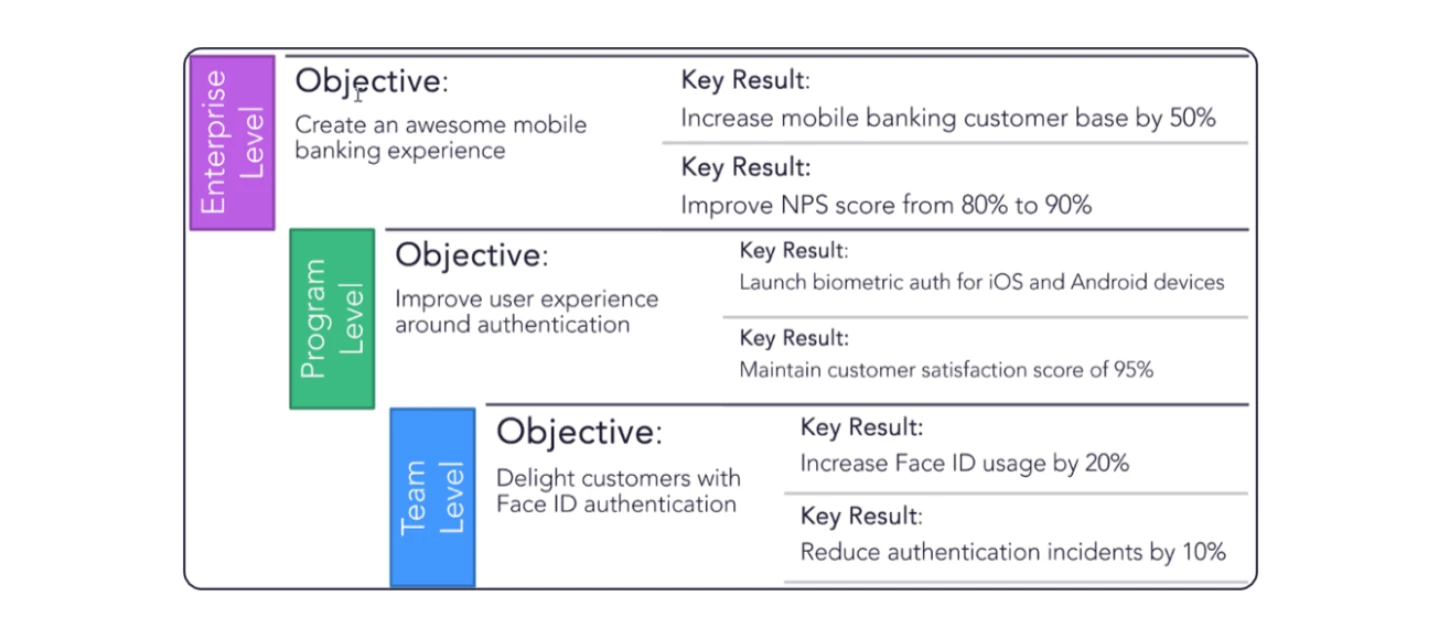
Tired of setting vague goals that never seem to materialize? It's time to discover the power of Objectives and Key Results (OKRs). This proven framework can help your organization achieve its most ambitious goals with laser-sharp focus and accountability.What are OKRs?Think of OKRs as your organization's personal GPS. They provide a clear roadmap to success by:Defining your destination: Objectives set the course for where you want to go. Providing mile markers: Key Results are the measurable steps you'll take to get there.Why use OKRs?Alignment: Everyone knows where they're headed and how their work contributes to the bigger picture. Focus: Prioritize what matters most and eliminate distractions. Accountability: Everyone is held responsible for their part in achieving the goals. Transparency: Progress is visible to everyone, fostering collaboration and motivation.How to write effective OKRs:Make objectives ambitious but achievable. Define key results that are SMART (Specific, Measurabl
Your software toolchain may be complex, but your integrations donβt have to be.Teams thrive when theyβre empowered to use the tools they know and prefer, but that often comes at the cost of time-consuming, manual data entry to keep everything aligned across the organization.With Planview Hubβs enhanced integration, those wasted hours are a thing of the past. You can now automatically sync data across Portfolios, and your entire toolchainβfreeing your teams to focus on what really matters.Not only that, but youβll see improved productivity thanks to:A tangible connection from planning strategy all the way to execution at the team level, so you can measure the impact of software delivery A future-proof organization supported by an integration solution that grows and expands along with your toolchain A Universal Connector that you can use to bring those in-house or industry-specific solutions into the fold Easier audits and traceability thanks to automatic synchronization at the requireme
When determining the right column set for the Plan screen when you are building a schedule you need to consider your process .You want to put the most commonly used structures first.Β When setting up your schedule you will need to use Schedule Start, Schedule Finish and Schedule duration. You will use these three the most in determining your schedule.Schedule Start is the start date for the remainder of the work,Β Schedule Duration is the remainder of the duration. If the task is complete the Schedule columns will be blank.Β Β Β I have added in Actual/Schedule Start , Actual/Schedule Finish and Duration at complete. These three fields will show you the information on a project that has been started. If the Task has been started the Actual Start will show if it has not the Schedule Start andΒ Actual Schedule Start will be the same. These Fields cannot be edited.Duration at complete is calculated for the entire duration of a task. For a task that is not complete it is from the Actual Start t
Hey, new to Portfolios administration here.Β Is it possible to move PPL level work within the Work Structure?Β With Resources, we can cut/paste a resource to a new branch.Β However, with work there doesnβt seem to be aΒ cut or copy option to move an entire project to another branch in the structure.
Iβve been doing alot of configuring of tiles and creating some new column sets to go along with them.Β Β I am finding that sometimes the column set specified in the tile definition doesnβt end up be the one shown.Β Β Similarly, I find if I have a personal column set defined with a specified order of columns, if I change the order of columns directly in the view that the column set often will not go back to the original order of the columns in the column set as it was originally specified.Β Β Β Β I am wondering if this is a caching sort of issue?Β Β Has anyone experienced this and/or have advice about how to manage?Β Thanks!
I am wondering what sets the default Work Portfolio.Β No matter what the last Work Portfolio I view, when I come back into Work, this one Work Portfolio always comes up.Β I no longer care about it so i guess I can delete it but Iβm wondering what is causing it to always be my default.Β Β
Over the last month, our Job Stream service has shut down twice over the weekend and not come back on. This is not accompanied by any error messages. This occurred first overnight August 3rd-4th, and most recently the night of August 28th-29th. Both times weβve had to submit a Customer Care ticket to get the job schedule service back up and running.Β Β My questions are:Has anyone else experienced this issue?Β Does anyone know what might be causing this and how to prevent it?Β Is there a way to restart the service on our own?Β
I wanted to understand how this project tracking against plan works. Actual vs forecast/budget etc
In our resource management process, the requirement is created; and the supervisor (resource manager) allocates.Β After the allocation is created from the requirement, the supervisors often update the allocation.Β The issue is that in the staffing screen, the supervisor cannot see (or at least we have not determined how to view) what remains in that requirement.Β Therefore, supervisors are OFTEN over allocating to the requirement.Β Bottomline is there a way to display the requirementβs remaining effort?
I am building a tile to show any projects opened in the last two weeks.Β Β Is there any way to do this in a tile?Β Β I am using a fixed date now but this will need to be manually updated every week.Β Any ideas appreciated.Β Β
Is there a way to do scenario planning in a schedule without it messing up my actual schedule
Is there a way to have an attributes parent level available to addΒ as a column? I was hoping the Generate parentΒ level fields would make that level available but it looks like that is only for the Primary structures.Β
Each year we run a cycle of annual planning, looking forward to the next 3 years or so, assessing existing and new candidate strategies and allocating budgets - an iterative approach which can take some months to complete, balancing off the ambition vs the budget.Β But this isnβt just about balancing the budget - Part of this exercise focuses on the resource capacity to manage the change, and whilst this should play a critical part in sequencing and βdoabilityβ planning, we're finding this difficult to perform within Planview & keen to understand how others take resource capacity into account.Β I assume we could make use of the functionality on ICP, but to do this, weβd need to spec out all candidate projects - using planning best practice that would mean building representative WBS's for everything, even when solutions are unclear, then creating the requirements against the WBS. Alternatively we can come up with some resource planning line for the duration of the delivery and raise
Hello everyone,Weβre excited to share the August 2024 release notes for Planview Portfolios. This release brings several new features, updates, and resolved issues that we believe will enhance your experience with our product.New Features and Updates: Data Visualization Widget:Β This new widget allows users at the Planview.Me and Portfolio Overview levels to view work portfolio insights in a visual format that is quickly consumable, such as a chart or graph. User-defined Planview.Me views:Β Users can now create their own Planview.Me views in Planview Portfolios. These views can be based on existing views configured by administrators or entirely new views customized by the end user. Performance - Staffing:Β Weβve improved the resource profile query used on the Staffing screen for resource portfolios and work entities, reducing the query response time by 90-99%. Plan screen - Run Schedule logging:Β Planview Portfolios now logs when the Run Schedule option is executed and which user ran
Elevate your project management game with the newΒ Planview Portfolios and ProjectPlace Connector!This powerful integration allows you to seamlessly connect your Planview Portfolios with ProjectPlace, streamlining your planning, tracking, and collaboration.Β Key Benefits:Effortless Syncing:Β Keep your plans and projects aligned with real-time updates. Enhanced Visibility:Β Gain comprehensive insights into your project performance. Streamlined Workflow:Β Reduce manual data entry and increase productivity.Donβt miss out on this opportunity to enhance your project management efficiency. Click the link to learn more and start optimizing your connected plans today!Explore the Connector
Hello - Many moons ago Planview used to publish an Administration Guide.Β Is there a comprehensive guide today that I can download?Β I struggle using Customer Success Centerβs search capabilities.
NatWest Group, formerly known as Royal Bank of Scotland, boasts a rich history spanning over 300 years and is headquartered in the UK, providing innovative financial products and services to various customer segments. Three years ago, under the leadership of Rachel Adams, NatWest adopted the Objectives and Key Results (OKR) framework to align over 4,000 projects and 400+ multi-year programs with strategic goals, ensuring measurable outcomes at each level. This transformation, driven by the need to simplify business operations amid emerging technologies and economic uncertainties, involves an annual investment of about $1B and quarterly reviews. Planviewβs Strategic Portfolio Management solution is vital for tracking progress and maintaining a single source of truth. Key lessons include understanding that OKRs differ from KPIs, recognizing OKRs as a long-term strategy, and the importance of thorough training. Moving forward, NatWest aims to enhance the connection of OKRs across the comp
A couple of weeks ago, somebody managed to switch off the βUse ProjectPlaceβ global setting which supports the syncing of PP cards with Portfolios (weβre still trying to work out how this happened...)Thatβs left us with 2 weeks worth of card updates which havenβt flowed through to Portfolios.Β Many of these cards are now closed so will never be touched again.Does anyone know - Is there a way to force-sync ProjectPlace cards to update Portfolios actions?
Hi Planview friends,Does anyone have a quick reference guide for their end users on when to use which product to use for what? We use Planview Portfolios, ProjectPlace, AgilePlace, IdeaPlace and Roadmaps.Β We are a large organization so we frequently are talking about βWhat is Planviewβ, βWhat Product should I use for my specific purposeβ, βWhat is the difference between AgilePlace and ProjectPlace?β.Β Β Although I feel I have a good handle on explaining them, it does take a bit and I wondered if there was a good one pager or site to address these questions most efficiently.Thank you in advance for your help!
We are newly getting into PowerBI reporting and would like increase the datamart update frequency from once a day.Β Β Does anyone have experience with this?Β If so, what frequency is working for you?Β Β Thanks!
Β We are excited to announce a significant enhancement in our Portfolios product: OKRs (Objectives and Key Results) for work items are now generally available! This new feature empowers customers to create OKRs directly from work items, providing a robust framework for measuring the benefit realization of projects.What This Means for YouWith the introduction of OKRs for work items, customers can now seamlessly integrate objective setting and tracking into their project management processes. This feature includes all the powerful functionalities of OKRs currently present under Strategy [Portfolios] and Board [AgilePlace], along with additional capabilities such as connected OKRs and custom attributes. [Refer to the screenshot]Key BenefitsΒ 1. Define and Track ObjectivesCustomers can now set clear objectives for individual work items, ensuring that every task contributes to the overall project goals. This not only provides a structured approach to project management but also helps in align
Share the link below and earn community points.
Already have an account? Login
No account yet? Create an account
Enter your E-mail address. We'll send you an e-mail with instructions to reset your password.